
How to protect your WiFi network? Whatever secret you need to keep, the password problem has been more or less the same since the dawn of time. You have to create one that is complex enough so nobody can guess it, and simple enough so you can remember it yourself.
Then, the ideal is to change your password regularly, and the more files, pages or networks you have to protect, the more you need a good memory.
PASS WIFI is the software that lets you hack a WiFi key in just a few minutes. It scans the network and recovers the packets in order to assemble them and determine the password.
Here is how it works:
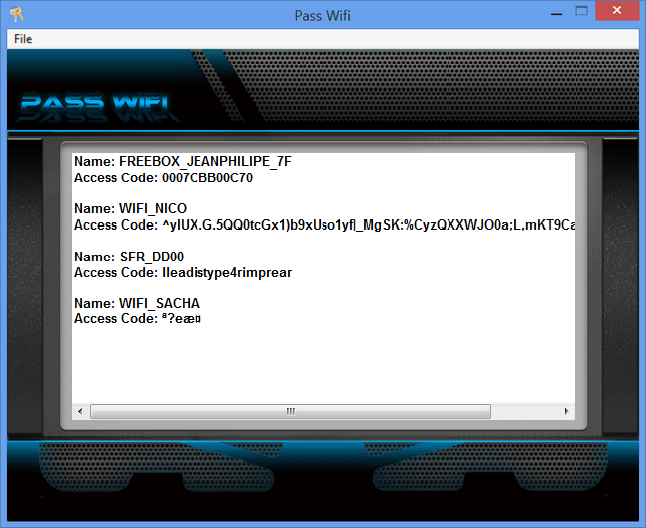
You will see by yourself that it displays the names of the networks as well as the associated passwords.
You can also connect to a WiFi network thanks to PASS WIFI, for that, get immediate access:
A good password to protect yourself
In practice, people do not think about the risk of hacking a home PC. We simply tell ourselves that we do not have anything on our PC that could interest a hacker.
But our computer hides treasures for anyone who knows how to look. It keeps all the traces of our browsing, through cookies or history, for example.
It then becomes very simple to find a WiFi password, when you know where to look, and to know your whole life in just a few minutes. Another point, it has happened that a hacker takes possession of a remote computer, and stores in a place secured by himself, files that belong to him.
As a result, you can no longer access this part of your own computer…
How to choose it?
Choosing a good password is therefore very important, not to hide things we would not be proud of, but to preserve our privacy.
We will therefore put aside all the most used and most common passwords. Every year, the list of the 100 most common passwords is published on the net, and it is easy to access. Here are some ideas for your password.
So forget the “12345” or the family names. They are among the first ones tested by hackers.
The perfect password
A good password is a code that contains letters, numbers and symbols (like dots, dashes, …). You should also know that on this point, you will have to respect the case, meaning that the field in which you insert your password makes the difference between uppercase and lowercase.
In fact “ADF56g” is different from “adf56g”. The ideal is to mix uppercase and lowercase in the same code.
In practice, the longer the password is, the harder it is to find. If in the past we were often limited to 8 or 10 characters, this is no longer the case today.
The final solution
You can therefore let yourself go and build real little sentences. The whole point, after that, is to manage to remember your password.
Because if building a complicated one is finally quite simple, remembering it is another story.
That is why one of the best solutions for choosing a password is a small simple sentence in the style of “I live in Brittany”, that you will transform into a code, this way for example: “Ilive-iN-the29”.
Here, you have uppercase, lowercase, symbols, letters, numbers and a lot of characters.
Hard to find, but simple to remember…
Accessing a WiFi network that is not yours without authorization is illegal. This content is educational and meant to help you protect your own network or recover a key you are allowed to use.
Also read: How to protect your WiFi network?
